
Download Charles Web Debugging Tool – Powerful HTTP Proxy for Mac, Windows, Linux
Overview
Charles Web Debugging Tool is a Java‑based HTTP proxy and monitoring utility that gives developers full visibility into the traffic flowing between their computer and the Internet. Originally built for macOS, Charles now runs on Windows and Linux as well, making it a cross‑platform staple for anyone who needs to inspect, modify, or replay HTTP and HTTPS requests. By acting as a man‑in‑the‑middle proxy, Charles captures every request header, response body, cookie, and caching directive, allowing you to troubleshoot API calls, debug AJAX calls, and verify the content of secure HTTPS sessions without ever leaving your development environment.
One of the standout capabilities is bandwidth throttling – the tool can simulate dial‑up, 3G, or custom network conditions, which is especially valuable for Flash, mobile, and responsive‑design testing. Recent updates have added Java 1.7 compatibility, fixed slow‑startup bugs, and improved SSL error handling, ensuring that the application remains fast, stable, and secure on modern systems. Whether you’re building a single‑page application, integrating a third‑party API, or simply need to see what data your browser is sending, Charles offers an intuitive UI, powerful filters, and a rich set of features that turn opaque network traffic into an actionable debugging resource.
Key Features
- Full HTTP/HTTPS Inspection: Capture request and response headers, bodies, cookies, and authentication details for any protocol.
- SSL Proxying: Decrypt and view encrypted traffic with a one‑click trust‑store installation, making HTTPS debugging painless.
- Bandwidth Throttling: Simulate slow connections (dial‑up, 3G, custom) to test performance under realistic network conditions.
- Reverse Proxy Mode: Act as a server‑side proxy to test how your application behaves when placed behind a gateway.
- Request/Response Editing: Modify headers or bodies on the fly and resend requests to see how servers react.
- XML/AJAX Support: Dedicated view for XML, JSON, and AJAX calls, with pretty‑printing and syntax highlighting.
- Session Recording & Export: Save entire browsing sessions and export them in HAR, XML, or CSV for sharing with teammates.
- Cross‑Platform Java Engine: Runs on macOS, Windows, and Linux without needing separate binaries for each OS.
- Search & Filter: Powerful search bar and filter rules let you isolate traffic from specific domains, MIME types, or status codes.
- Automation Friendly: Command‑line options and scripting hooks enable integration with CI pipelines and automated tests.
Installation & Usage Instructions
Installing Charles is straightforward thanks to its Java foundation. Begin by ensuring that Java 1.7 or later is installed on your machine; you can download the latest JRE from Oracle’s website or adopt OpenJDK if you prefer an open‑source runtime. Once Java is in place, download the appropriate installer from the official Charles website. macOS users receive a .dmg file that can be dragged into the Applications folder, while Windows users get a standard .exe installer and Linux users a .tar.gz archive that can be extracted to any directory.
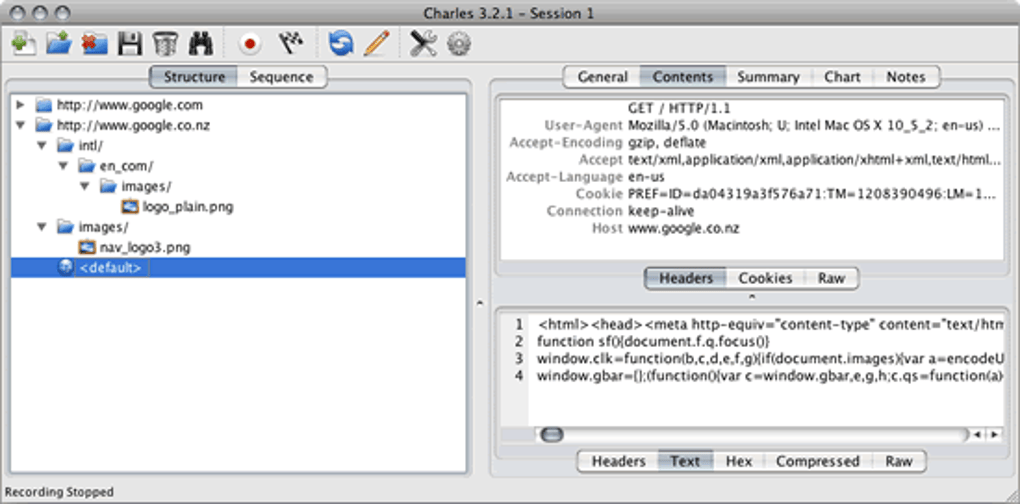
After installation, launch Charles and grant the necessary network permissions. On macOS, you’ll be prompted to allow the application to configure the system proxy; accept the dialog so that all traffic is automatically routed through Charles. Windows may require you to run the program as an administrator for the same reason. The first time you start Charles, the UI presents a three‑pane layout: a tree view of recorded sessions on the left, a detailed request/response view in the center, and a timeline/sequence view on the right. To begin capturing traffic, simply open your web browser or API client and browse as usual – Charles will populate the session list in real time.
To inspect HTTPS traffic, navigate to Proxy → SSL Proxying Settings, enable SSL proxying, and add the domains you wish to decrypt (or use “*” to capture all). Charles will then generate a root certificate that you must install into your system’s trusted store; detailed steps are provided within the app. Bandwidth throttling can be activated via Proxy → Throttle Settings**, where you choose a preset speed or define a custom latency and bandwidth limit. For developers working with APIs, the “Repeat” and “Rewrite” tools allow you to resend modified requests without leaving the interface, dramatically speeding up debugging cycles.
Finally, remember to stop the proxy when you’re done to restore normal network routing. Charles provides an easy “Stop Recording” button, and you can also disable the system proxy manually via network preferences. Exporting a session is as simple as selecting the desired entries, right‑clicking, and choosing “Export → Save as HAR/CSV”. This exported data can be shared with QA teams, attached to bug reports, or imported into other analysis tools.
Compatible Operating Systems: macOS 10.12+, Windows 7+, Linux (any distribution with Java 1.7+)
Conclusion & Frequently Asked Questions
Pros
- Comprehensive HTTP/HTTPS inspection with easy-to-use UI.
- Powerful bandwidth throttling for realistic performance testing.
- Cross‑platform support thanks to Java, covering macOS, Windows, and Linux.
- Robust SSL proxying that eliminates the need for external certificate tools.
- Extensive export options (HAR, CSV, XML) for collaboration and documentation.
Cons
- Requires Java, which some organizations consider a security overhead.
- Full‑screen capture can generate large session files on busy networks.
- Licensing is not free; a trial is available but a paid license is required for long‑term use.
- Initial configuration of SSL certificates may be intimidating for beginners.
- UI, while functional, feels a bit dated compared to newer cloud‑based debuggers.
FAQ
Is Charles free to use?
Charles offers a 30‑day fully functional trial. After the trial period, a single‑user license must be purchased to continue using the software.
Can I use Charles to debug mobile apps?
Yes. By configuring your mobile device to use the computer’s IP address as a proxy, Charles can capture traffic from iOS, Android, and other platforms, including HTTPS after installing the Charles root certificate on the device.
How does bandwidth throttling work?
Throttling inserts artificial latency and limits the data transfer rate for each request. You can select predefined profiles (e.g., 56 kbps dial‑up) or define custom latency/bandwidth values to simulate any network condition.
Is Java still required for the latest version?
Yes. Charles runs on a bundled Java runtime, and the installer ensures that a compatible Java 1.7+ environment is present. The application now ships with its own JRE on macOS and Windows, reducing manual setup steps.
Can I export captured sessions for sharing with teammates?
Absolutely. Sessions can be exported as HAR files (compatible with Chrome DevTools), CSV, or XML. This makes it easy to attach logs to bug reports or feed them into automated analysis pipelines.
In summary, Charles Web Debugging Tool remains one of the most reliable and feature‑rich HTTP proxies for developers across all major operating systems. Its ability to decode HTTPS traffic, simulate slow networks, and edit requests on the fly saves countless hours of troubleshooting. While the need for a Java runtime and a paid license may be drawbacks for some, the productivity gains and deep insight into network behavior far outweigh these concerns. If you’re serious about API development, mobile testing, or performance optimization, downloading Charles today is a smart investment. Click the button below to start your free trial and experience the power of a professional web debugging suite.







